The Ultimate Guide To MSP Keyword Research: Featuring SEMRush

Are you trying to increase your MSP’s visibility in search and generate more inbound leads from SEO? A smart first step is getting a clear baseline of how you’re performing today and deciding what you actually want to compete for on search. That starts with keyword research, which is the process of identifying the exact terms your ideal buyers use and helps you assemble a keyword list that you can use to monitor your rankings and competitors over time.
In this article you’ll learn what keyword research is, why it is essential for MSPs, and how to set up a simple SEMrush position tracking project for your primary city. We’ll show you how can research, tag, and load a clean list of local, near me, and non-local service keywords across your core domains like IT Support, Cybersecurity, Networking, Cloud, Servers, and Firewalls into SEMRush. The takeaway is simple, you will leave with an organized keyword list and a live tracking project that establishes your baseline and shows where you are winning or losing in terms of SEO visibility. Let’s dive right in.
What Is MSP Keyword Research?
MSP keyword research is the process of finding and prioritizing the search phrases real buyers use when they look for services like yours in your market. It is not random brainstorming. It is a structured way to confirm demand, focus your efforts, and avoid creating website content advertises products and services no one is actually searching for.
There are three useful shapes of keywords. Head terms are short and broad, such as IT support, and often have higher volume with more competition. Long-tail keywords are longer phrases with clearer intent, such as IT support for small business in Denver, and are usually easier to win. Modifiers add context to a base keyword like “IT Support” , such as city names, “near me”, “for small business”, or industry terms like “for attorneys”.
For a keyword tracking project, focus on transactional and commercial intent keywords first. These are the phrases that signal buying behavior, for example managed IT services Denver, cybersecurity company near me, IT support pricing, or best MSP in Denver.
Informational intent keywords, such as what is a managed firewall are valuable for content marketing and blogging, but they are not the primary focus when your goal is to measure visibility for core service pages and your core site structure. Keeping your tracking set centered on transactional and commercial intent gives you a solid baseline that reflects how your website competes for revenue-driving searches.
Why MSP Keyword Research Matters
MSP keyword research gives you a clear plan for what to build next. It tells you which service pages, city pages, and supporting content should exist on your site, based on how buyers actually search. That clarity prevents the common trap of publishing random pages that do not align with demand or drive leads.
By focusing your tracking set on transactional and commercial intent keywords, you can see where you have visibility today and where you are missing coverage. Tagging keywords by domains like IT Support, Cybersecurity, Networking, Cloud, Servers, and Firewalls highlights strengths and gaps. If cybersecurity terms are strong but networking is thin, you know which landing pages deserve priority.
This discipline links effort to outcomes. Instead of guessing, you use data to decide what to publish and in what order, then you can measure progress against the same keywords you targeted. We will stay focused on research and loading in this article, and you can use the results to shape a content and page plan later.
Set Up Your SEMrush Project For Tracking Keywords
Start with a clean, simple setup so your data is easy to trust and easy to manage.
- Create your project
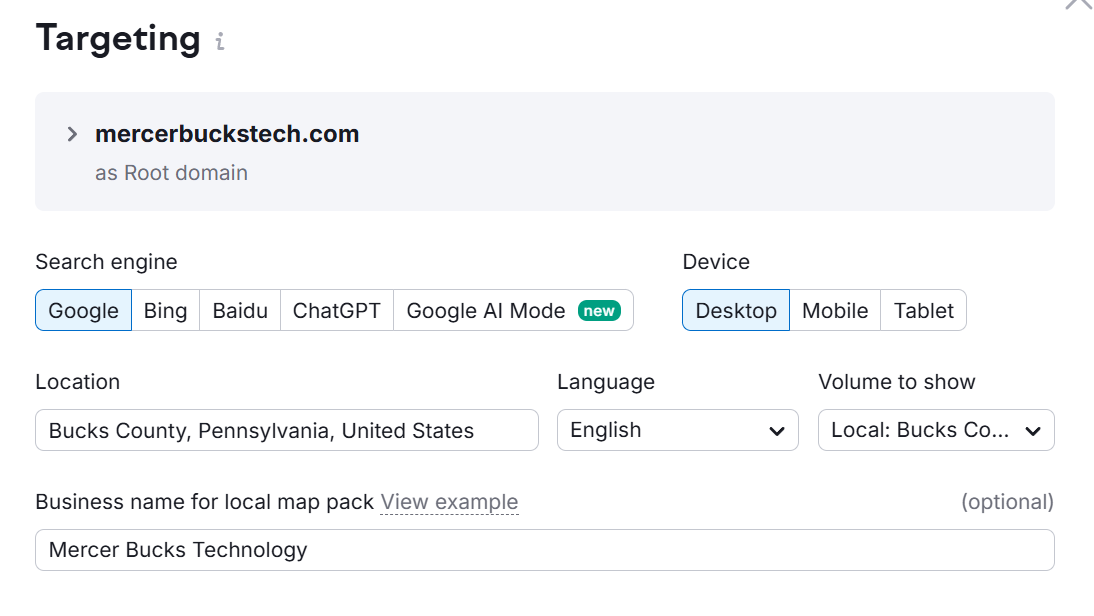
Open Position Tracking in SEMrush and create a new project for your domain. Give it a clear name so you can find it later when you add more locations. - Choose tracking defaults
Select Google as the search engine and Desktop as the device. For most MSP keyword research, desktop Google provides the highest-volume, most stable baseline. - Pick one location to start
Set the location to your most important city or metro. Begin with a single city so you can learn how the tracking behaves before you expand. If you serve a wider region or have multiple offices, you can add more cities later as separate targets or views. - Save the project
Confirm the settings and save. You now have the framework ready for loading keywords specific to your primary city, which keeps your tracking aligned with how buyers search in your market.
See: SEMRush Position Tracking Setup Guide
Build Out Your MSP’s Keyword List
Choose the right database
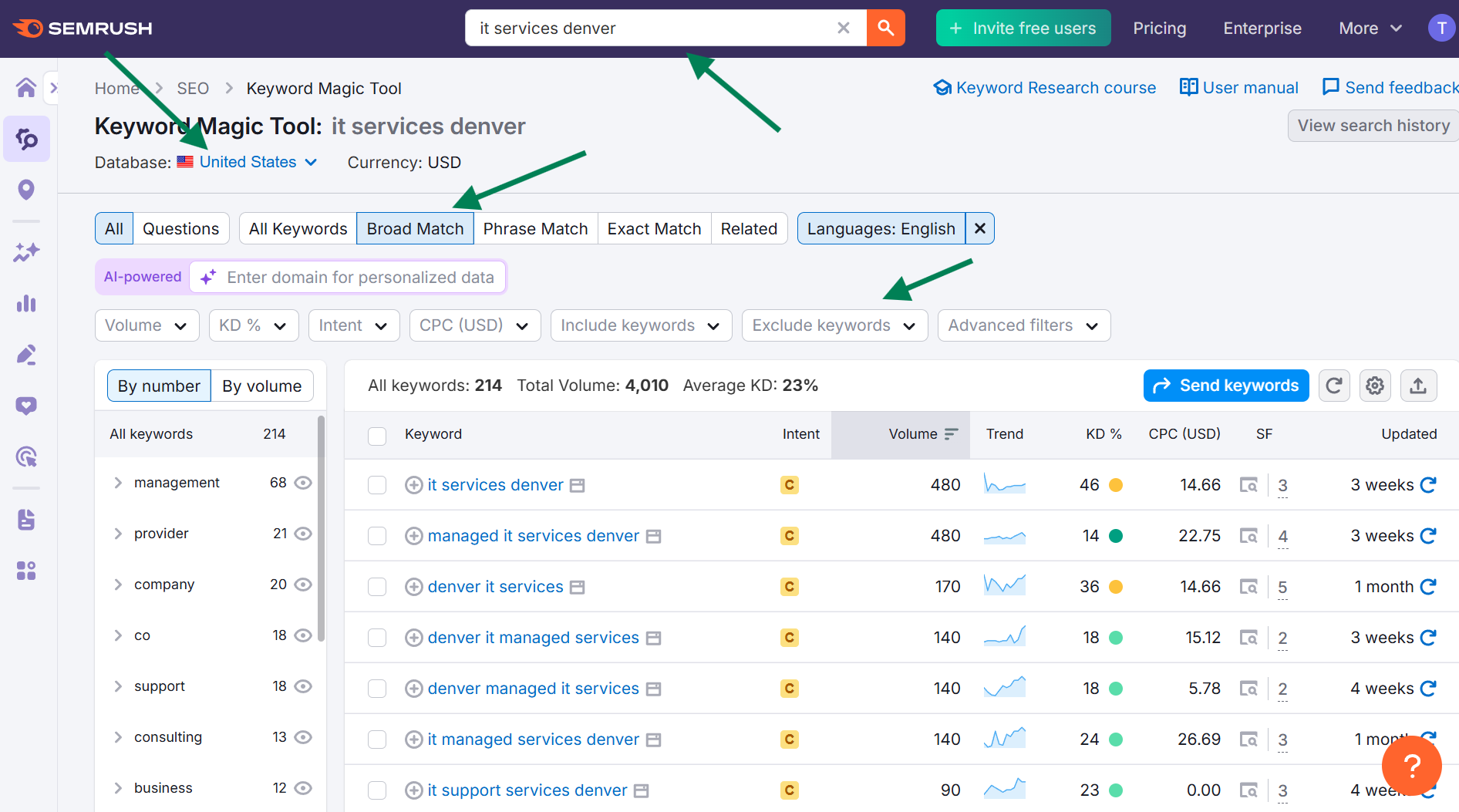
Open SEMrush’s Keyword Magic Tool and select the database for your country, such as United States or Canada. This keeps volumes and ideas relevant to your market. City targeting happens later in Position Tracking, so the national database is enough during research.
Seed smart, then refine
Think about what you want to rank for, then start broad and narrow until the results are manageable. If the end goal is a search like managed IT company in Denver, begin wider with a seed such as IT Denver. A Broad Match search on IT Denver will return a large discovery set. Narrow it by adding a word to get IT company Denver for a more condensed list. Tighten again with managed IT company Denver if you still see more than about one to three pages of results. This broad to narrow pattern keeps MSP keyword research fast without drowning in noise.
Match types and when to use them
Broad Match is the best starting point for discovery because it surfaces related ideas, not just literal matches. Phrase Match keeps your words in the results, which helps filter a list you already like. Exact Match is a precision tool for wide net, non-local seeds like IT company that can produce huge lists. Most city searches will be fine with Broad and sometimes Phrase.
- Broad Match: returns any variation of your seed in any order.
- Phrase Match: includes your exact words, often in various orders.
- Exact Match: uses your exact words in the exact order.
- Related: suggests similar ideas you might have missed.
Work from discovery to focus
Begin with Broad Match and adjust the seed itself to narrow the set until you land at roughly one to three pages of results. If the lists your finding are too long, switch to Phrase Match to reduce noise. Save Exact Match for non-local head terms where the goal is tighter control of a very large result set.
Use exclusions to clean results
You can also apply Keyword Exclusions to tighten the results without losing discovery value. Start by excluding common question words like who, what, when, where, why, and how to remove informational queries that belong in a blogging exercise rather than a tracking project focused on transactional and commercial intent.
You can also filter out irrelevant traffic from people searching for things like jobs by excluding keywords like:
- jobs
- job
- careers
- career
- resume
- resumes
- salary
Trim low intent price hunters by excluding things like free, cheap, and affordable. Add home, consumer, residential, etc if they appear often. Enter these in the Exclude Keywords field, check how many pages remain, and iterate until you reach that one to three page sweet spot.
Repeat across core MSP domains
Repeat this MSP keyword research workflow for the core services you actually sell. Prioritize commercial intent buckets such as IT support, IT services, IT company (and close synonyms for company like firm and provider), IT solutions, computer support, server support, network support, firewall support, IT consulting, and cloud services.
Think about your specific domains and run searches for each domain in your primary city, for example IT services Denver, IT solutions Denver, server support Denver, network support Denver, managed services Denver, IT consulting Denver, and cloud services Denver. Some MSPs do things like software development or AI consulting, others do not.
Start with cities and near me searches, expand out as needed
Local searches in proximity are one of the most straightforward ways to build a strong keyword list. Start with service plus city name queries as your baseline, for example IT support Denver or managed services Denver. Then run service plus near me queries like IT support near me or cybersecurity company near me to see how you are competing in the local market. This pairing gives you immediate, lead generation focused local signals for MSP keyword research.
As you expand your list over time, add in searches for industry terms and broader ideas. Try vertical phrases such as IT for attorneys or IT services for manufacturers, add “for small business” variations like cybersecurity for small business, and sample a few head keywords without qualifiers such as IT company or managed IT services. Expect these to be more competitive and harder to rank for. That is why a solid starting point is local city keywords and near me keywords, which provide clearer opportunities and faster feedback.
Organize your workbook
Create an Excel file with tabs by theme, for example IT Support, IT Services, IT Company, Server Support, Cybersecurity, Networking, and Cloud. Copy and paste the raw keyword rows directly from SEMrush into the matching tabs. This simple structure keeps your MSP keyword research tidy and sets you up for more easily tagging your keywords before loading them into SEMRush which we’ll cover in the next section.
Tag Your Keywords for MSP Keyword Research
Why tagging matters
Tagging your keywords lets you view visibility in SEMrush by tag. You can compare performance against competitors for a specific domain like Cybersecurity or IT Support, or isolate only your near me keywords if those are tagged. Tagging takes time and can feel cumbersome, but it is a key ingredient in MSP keyword research success because it gives you the visibility slices you need to build and execute an effective SEO plan.
There is no single right or wrong way to tag. Building your list in an Excel spreadsheet is helpful because it gives you room to change your mind later. As you use SEMrush and view visibility by tags, you will almost certainly want to adjust your taxonomy. A simple spreadsheet makes that re-tagging and reloading process much easier. The framework below is a practical starting point, not a rigid rule.
Use multiple tags per keyword
Most keywords deserve more than one tag. For example, “it support near me” should carry both a domain tag and a modifier tag:
- Domain: IT Support
- Modifier: near-me
If a keyword includes a city, add that city name as a location tag, for example Denver. For near me keywords, do not add a city tag. Near me queries rely on the searcher’s device location, so a city tag can blur the analysis.
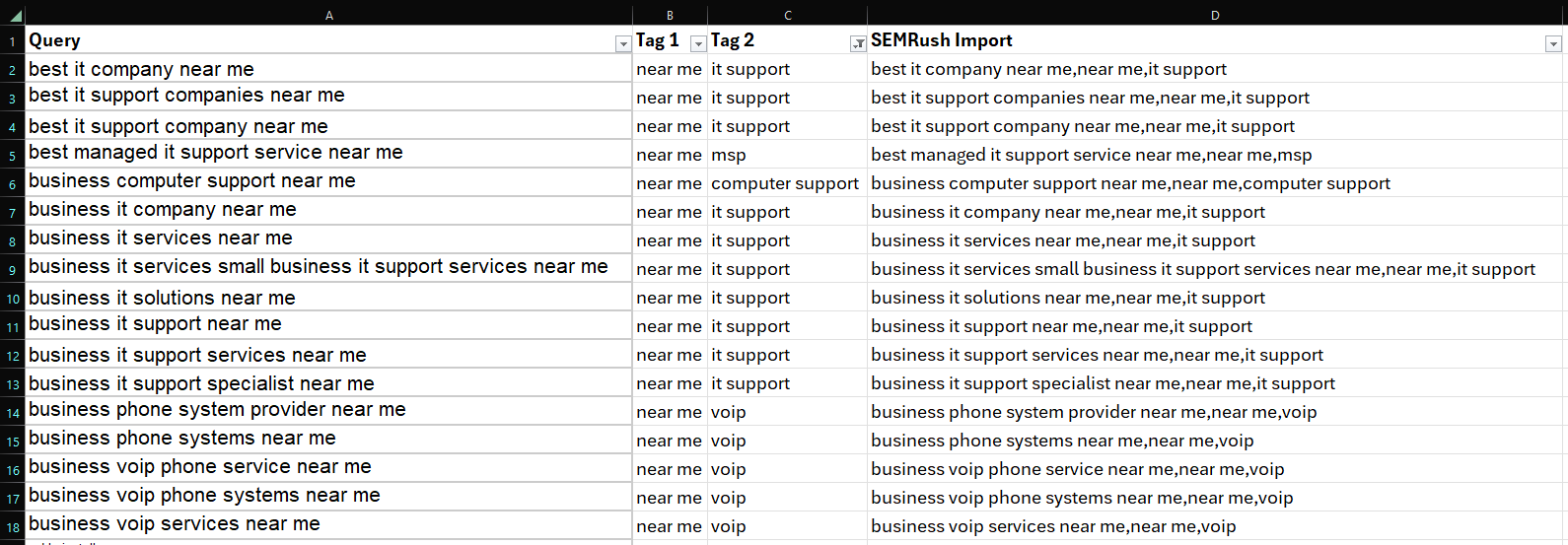
Spreadsheet setup that makes tagging manageable
Keep it lightweight:
- Column A: Keyword
- Column B: Domain tag (IT Support, Cybersecurity, Networking, Cloud, Servers, Firewalls, etc.)
- Column C: Location tag (Denver)
- Column D: Modifier tag(s) (near-me, small-business)
When you are ready, create a single Tags field by concatenating your tag columns so SEMrush can ingest them. A simple concatenate or text-join function in Excel to merge columns into an SEMRush importable column.
Quick examples
- it support denver: IT Support, Denver
- cybersecurity company near me: Cybersecurity, near-me
- network support denver for small business: Networking, Denver, small-business
- it company: IT Services
Sanity check before you load
- Every keyword has at least one domain tag.
- City names are used as location tags only when the keyword includes a city.
- Near me keywords are tagged near-me without a city tag.
- Modifiers like small-business are applied where relevant.
- Don’t worry about duplicates, SEMRush can de-duplicate on import.
Clean, flexible tagging keeps your MSP keyword research organized from day one while preserving the freedom to evolve your taxonomy as you learn.
Load Your MSP Keywords Into SEMrush
Import your list
Open Position Tracking in SEMrush and use the import option. Paste or upload your keyword list and include the comma separated Tags field from your spreadsheet. SEMrush will attach those tags so you can filter by domain, location, and modifiers as part of your MSP keyword research.
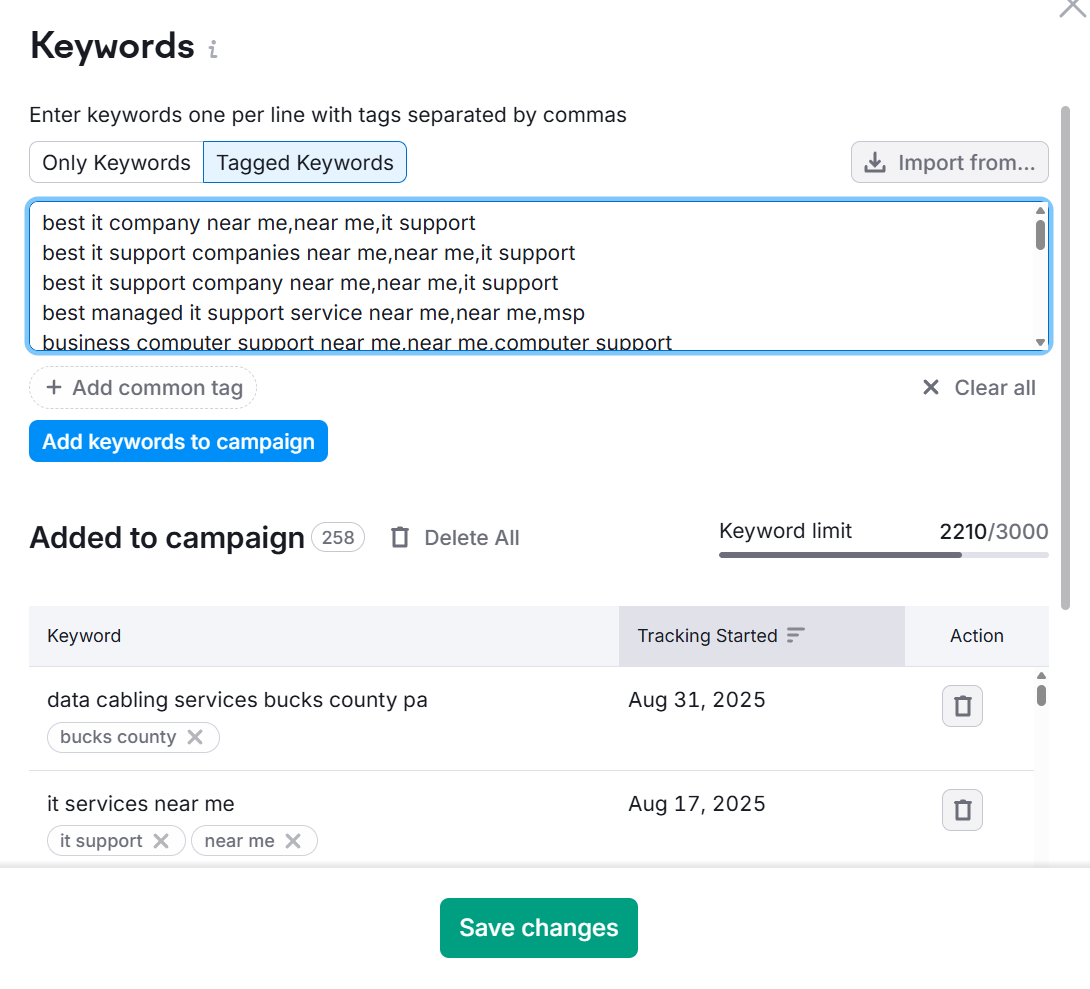
Step away while rankings are collected
After import, SEMrush needs time to crawl and populate rankings. This can take several hours, often about four to eight. Plan to step away and check back the next day so you are reviewing a complete data set rather than partial results.
Review your project and iterate if needed
When data is in, scan your tag groups to confirm the right keywords landed in the right buckets. If something feels off, do not hesitate to adjust your spreadsheet, delete the keywords in the project, and re-import. It can take a few passes to get your structure exactly how you want it, and that is normal for practical MSP keyword research.
Assess your competitive stance on search engines
Use Competitor Discovery
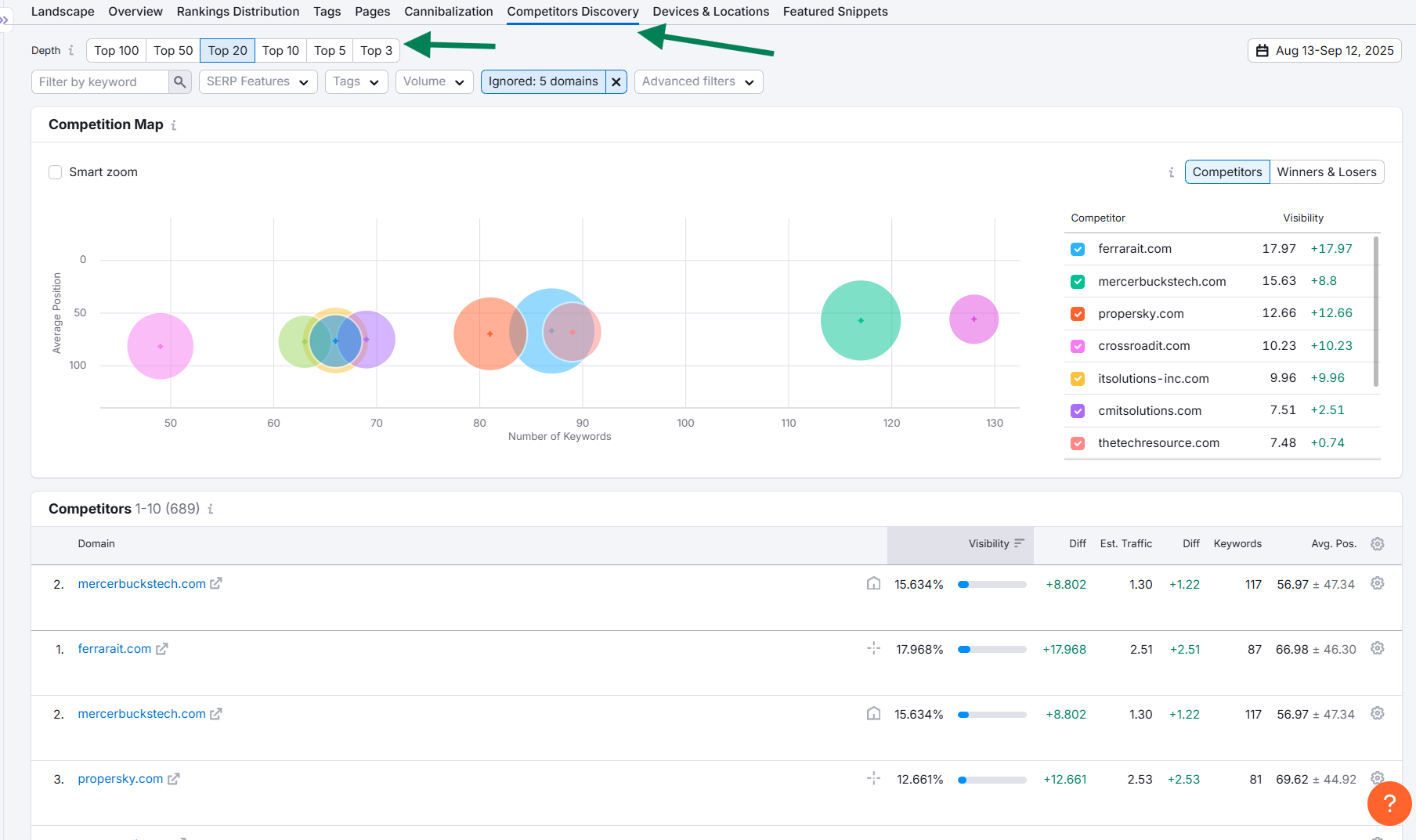
Open the Competitors tab in your Position Tracking project and click Competitor Discovery. This shows who ranks most often for the keywords you just loaded in your city and anchors your MSP keyword research to the real players in your market.
Filter and clean the list
Hide irrelevant domains that are not direct competitors, such as business directories, job boards, or generic review sites. This reduces noise and keeps your list focused on MSPs and IT providers.
Toggle the Depth setting to filter by how high a site must rank to count as a competitor. Test Top 50, Top 20, Top 10, Top 5, and Top 3 to zero in on the most relevant rivals for your tracked keywords.
Add up to 20 competitors. Favor local peers and regional providers that consistently appear for your service terms.
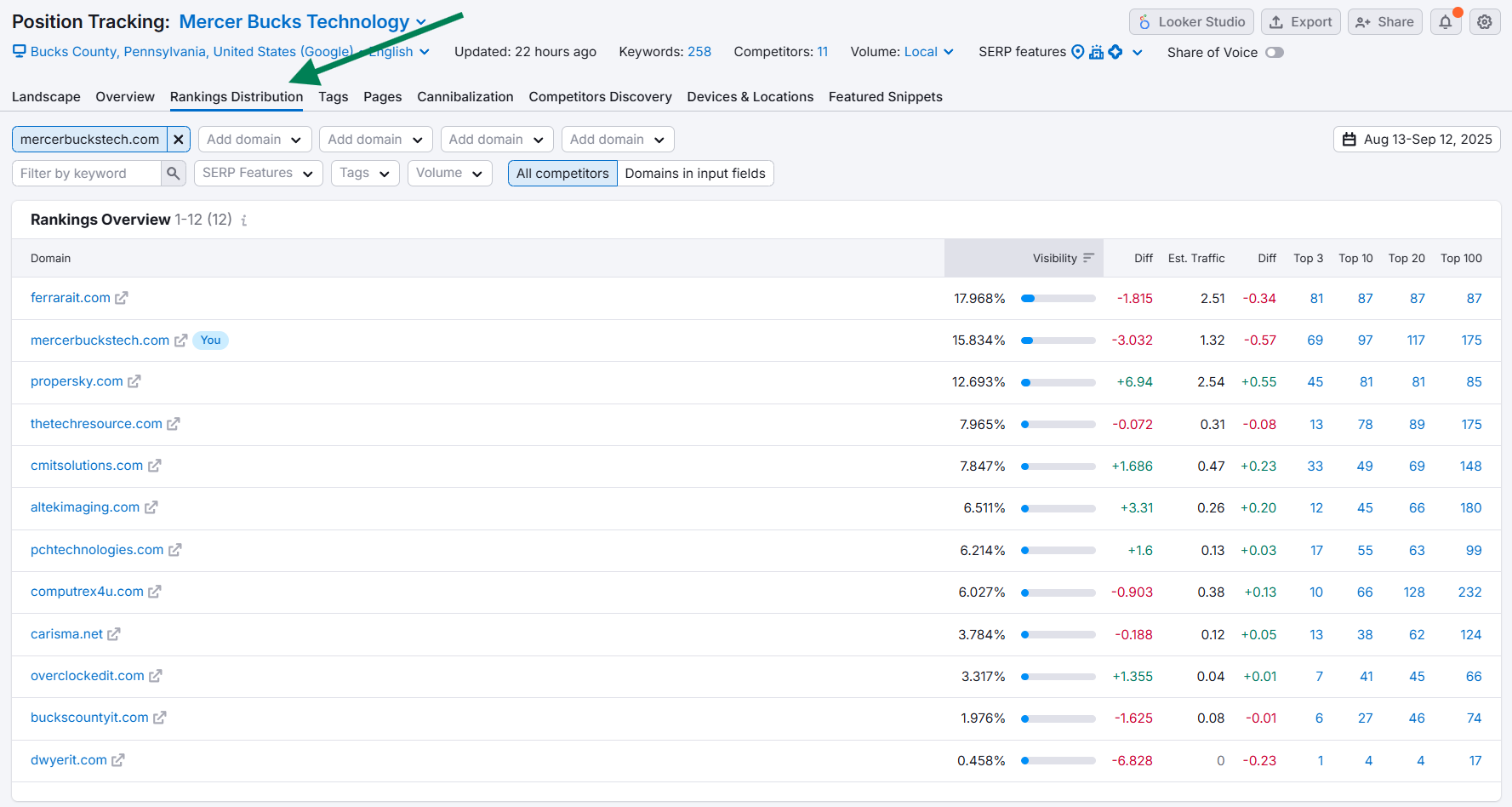
Monitor your stance in Rankings Distribution
After you add competitors, open the Rankings Distribution tab. This view shows how many of your tracked keywords sit in Top 3, Top 10, Top 20, and beyond compared to each competitor. Use it to understand your overall market position and whether you are moving closer to the leaders in core domains like IT Support, Cybersecurity, Networking, Cloud, Servers, and Firewalls.
Evaluate your visibility in the Tags tab
What the Tags tab shows
In your Position Tracking project, open the Tags tab. It groups rankings and visibility by tags for different keywords. It is similar to the Rankings Overview, but you get an assessment by tag so you can see how much market share you hold for each specific slice of demand. This makes MSP keyword research actionable by domain and modifier.
Read the key metrics
Focus on Visibility percentage, Average Position, and counts in Top 3 and Top 10 for each tag. Strong Top 3 in Cybersecurity with weak results in Networking, for example, signals an imbalance you may want to address.
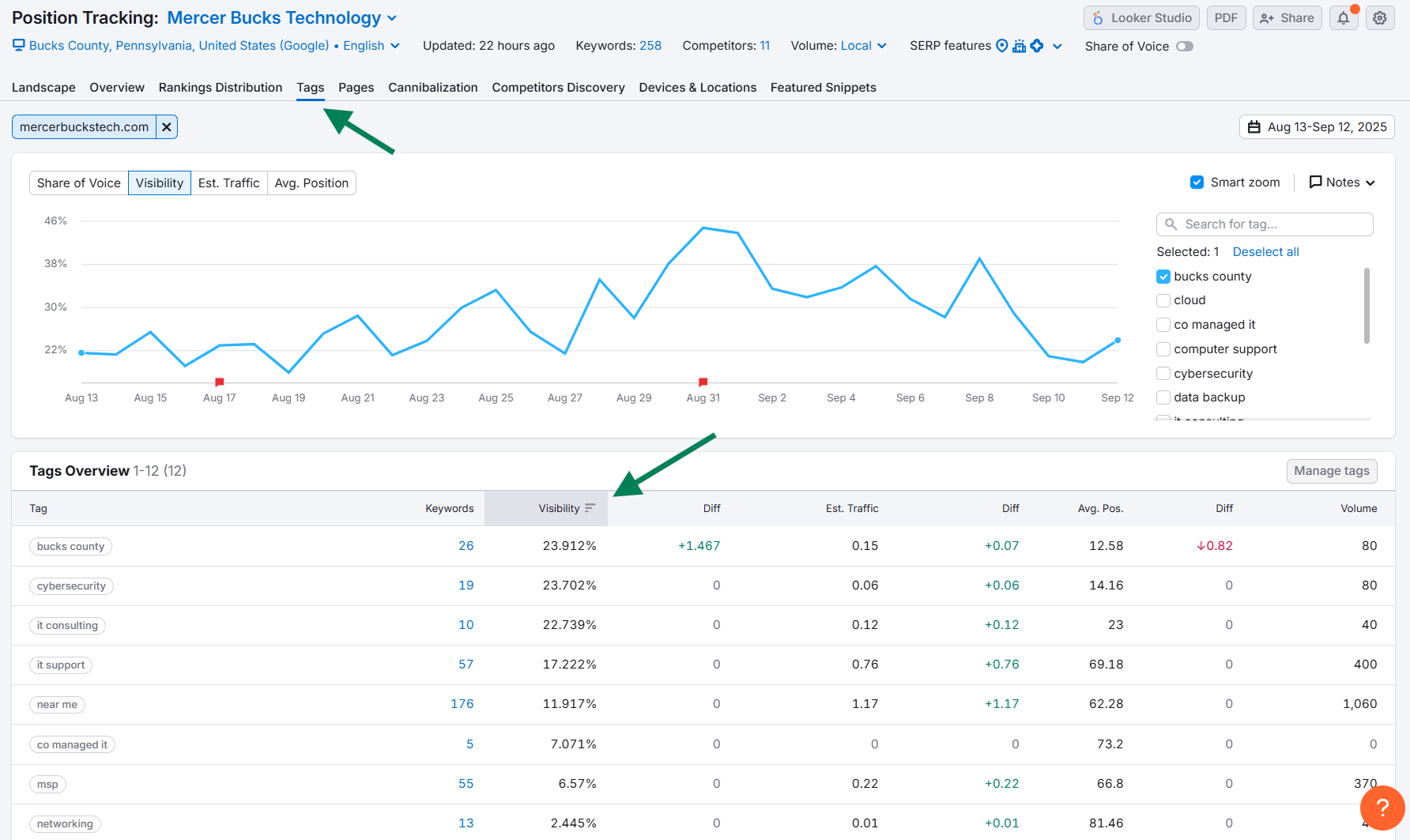
Filter other tabs by a tag
Click any tag to filter the rest of the interface by that tag. Then move to the Competitors Discovery tab and you will see competitors only for the keywords inside that tag. This helps you spot category-specific rivals and decide whether to add them to your competitor list.
Example workflow
If networking is a critical service for your MSP, click your Networking tag in the Tags tab. Jump to Competitors Discovery with the filter still applied. Review which providers dominate networking keywords and add relevant ones you might have missed. Repeat this process for other important tags such as IT Support, Cybersecurity, Cloud, Servers, and near me.
Conclusion
In this post, we walk through the process of conducting keyword research for your MSP, including setting up a SEMrush keyword tracking project, building a focused list with the Keyword Magic Tool, tagging keywords by service domains and modifiers, loading them into Position Tracking, assessing your competitive stance on search engines, and reviewing visibility in the Tags tab.
MSP keyword research and tracking can feel like a long and cumbersome process, but it is worth the effort to get started with. It can help you develop a clear SEO roadmap and is an objective way to monitor your competitive stance in the market and react to changing market conditions over time.
Next steps
Sign up for SEMrush today and start using it to build out your keyword list, track the most important keywords for your MSP in a desktop Google project for your primary city, and begin monitoring your competitive stance in the market using Competitor Discovery, Rankings Distribution, and the Tags tab.
Get help with your MSP Keyword Research Efforts
At Tortoise and Hare Software, we are experts in SEO for MSPs and can assist you with conducting keyword research for your MSP. We can help you build a clean, tagged keyword list, set up SEMrush tracking for your primary city, and assess competitors and tag-level visibility so you can generate more inbound leads from search engines. Reach out to Tortoise and Hare Software to learn how we can help you dominate SEO in your market.
About The Author